Showing posts with label java Threads. Show all posts

Suspending, Resuming and Stopping Threads

Monday, 12 November 2012
While the suspend( ), resume( ), and stop( ) methods defined by Thread class seem to be a perfectly reasonable and convenient approach to managing the execution of threads, they must not be used for new Java programs and obsolete in newer versions of Java.
The following example illustrates how the wait( ) and notify( ) methods that are inherited from Object can be used to control the execution of a thread.

This example is similar to the program in the previous section. However, the deprecated method calls have been removed. Let us consider the operation of this program.


class MyThread implements Runnable
 {
  Thread thrd;
  boolean suspended;
  boolean stopped;

  MyThread(String name) {
    thrd = new Thread(this, name);
    suspended = false;
    stopped = false;
    thrd.start();
  }

  public void run() {
    try {
      for (int i = 1; i < 10; i++) {
        System.out.print(".");
        Thread.sleep(50);
        synchronized (this) {
          while (suspended)
            wait();
          if (stopped)
            break;
        }
      }
    } catch (InterruptedException exc) {
      System.out.println(thrd.getName() + " interrupted.");
    }
    System.out.println("\n" + thrd.getName() + " exiting.");
  }

  synchronized void stop() {
    stopped = true;
    suspended = false;
    notify();
  }

  synchronized void suspend() {
    suspended = true;
  }

  synchronized void resume() {
    suspended = false;
    notify();
  }
}

public class Maincode
 {
  public static void main(String args[]) throws Exception {
    MyThread mt = new MyThread("MyThread");
    Thread.sleep(100);
    mt.suspend();
    Thread.sleep(100);

    mt.resume();
    Thread.sleep(100);

    mt.suspend();
    Thread.sleep(100);

    mt.resume();
    Thread.sleep(100);

    mt.stop();
  }
}
Output 

G:\>javac Maincode.java

G:\>java Maincode
.........
MyThread exiting.

Suspending, Resuming and Stopping Threads

Java Thread Deadlock tutorial with example

Deadlock Frog vs Snake


A special type of error thatyou need to avoid that relates specifically to multitasking is deadlock ,which occurs when two threads have a circular dependency on a pair of synchronized objects.For example ,suppose one thread enters thr monitor on a object X and another  thread enters the monitors on object y.If the thread in X tries to call any synchronized method on Y,it will block as expected .However ,if the thread in y in turn X, it would have to release its own lock on Y so that the first thread could complete .Deadlock is a difficult error to debug for teo reason:

1)In General ,it occurs only rarely ,When the two threads time slice in just the right way .

2)It may involve more than two threads and two synchronized objects .


Program : Deadlock.java

public class Deadlock
{
  public static void main(String[] args)
    {
    //These are the two resource objects
    //we'll try to get locks for

    final Object resource1 = "resource1";
    final Object resource2 = "resource2";

    //Here's the first thread.
    //It tries to lock resource1 then resource2

    Thread t1 = new Thread()
     {
      public void run()
       {
         //Lock resource 1

        synchronized(resource1)
         {
          System.out.println("Thread 1: locked resource 1");

          //Pause for a bit, simulating some file I/O or
          //something. Basically, we just want to give the
          //other thread a chance to run. Threads and deadlock
          //are asynchronous things, but we're trying to force
          //deadlock to happen here...

          try
          {
            Thread.sleep(50);
          } catch (InterruptedException e) {}

          //Now wait 'till we can get a lock on resource 2
          synchronized(resource2)
          {
            System.out.println("Thread 1: locked resource 2");
          }
        }
      }
    };

    //Here's the second thread.
    //It tries to lock resource2 then resource1

    Thread t2 = new Thread(){
      public void run(){
        //This thread locks resource 2 right away
        synchronized(resource2)
     {
          System.out.println("Thread 2: locked resource 2");

          //Then it pauses, for the same reason as the first
          //thread does

          try
      {
            Thread.sleep(50);
          }
      catch (InterruptedException e){}

          //Then it tries to lock resource1.
          //But wait!  Thread 1 locked resource1, and
          //won't release it till it gets a lock on resource2.
          //This thread holds the lock on resource2, and won't
          //release it till it gets resource1.
          //We're at an impasse. Neither thread can run,
          //and the program freezes up.
        
        synchronized(resource1){
            System.out.println("Thread 2: locked resource 1");
          }
        }
      }
    };

    //Start the two threads.
    //If all goes as planned, deadlock will occur,
    //and the program will never exit.

    t1.start();
    t2.start();
  }
}
Output 

G:\>java Deadlock
Thread 1: locked resource 1
Thread 2: locked resource 2


Java Thread Deadlock tutorial with example

Inter Thread Communication in Java Programming

Consider the classic queuing problem, where one thread is producing some data and another is consuming it. To make the problem more interesting, suppose that the producer has to wait until the consumer is finished before it generates more data.
In a polling system, the consumer would waste many CPU cycles while it waited for the producer to produce. Once the producer was finished, it would start polling, wasting more CPU cycles waiting for the consumer to finish, and so on. Clearly, this situation is undesirable.

The Preceding examples unconditionally blocked other threads from Asynchronous access to certain methods.This use of the implicit monitors in java objects is powerful,But you can achieve a more subtle level of control through inter process communication.

We can say like : Inter-thread communication is all about making synchronized threads communicate with each other. Inter-thread communication is a mechanism in which a thread is paused running in its critical section and another thread is allowed to enter (or lock) in the same critical section to be executed.

 Java includes an elegant inter process communication mechanism via the following methods:

1)wait() method:

Causes current thread to release the lock and wait until either another thread invokes the notify() method or the notifyAll() method for this object, or a specified amount of time has elapsed. The current thread must own this object's monitor.This method tells the calling thread to give up the monitor and go to sleep until some other thread enters the same monitor and calls notify( ).Syntax:

public final void wait()throws InterruptedException

public final void wait(long timeout)throws InterruptedException

2)notify() method:


Wakes up a single thread that is waiting on this object's monitor. If any threads are waiting on this object, one of them is chosen to be awakened. The choice is arbitrary and occurs at the discretion of the implementation.Syntax:

public final void notify()

3)notifyAll() method:


Wakes up all threads that are waiting on this object's monitor.This method wakes up all the threads that called wait( ) on the same object.c The highest priority thread will run first.

public final void notifyAll()

 The sample Program and output is


Program SynMethod.java

class Customer
{
 int amount=0;
 int flag=0;
 public synchronized int withdraw(int amount)
  {
    System.out.println(Thread.currentThread().getName()+" is going to withdraw");
  
       if(flag==0)
        {
        try
         {
        System.out.println("waiting....");
        wait();
     }
        catch(Exception e){}
    }
    this.amount-=amount;
    System.out.println("withdraw completed");
    return amount;
  }

 public synchronized void deposit(int amount)
  {
    System.out.println(Thread.currentThread().getName()+" is going to  deposit");
    this.amount+=amount;
  
    notifyAll();
    System.out.println("deposit completed");
        flag=1;
  }


}

public class SynMethod
{
  public static void main(String[] args)
   {
    final Customer c=new Customer();
  
    Thread t1=new Thread()
         {
        public void run()
                 {
            c.withdraw(5000);
            System.out.println("After withdraw amount is"+c.amount);
         }
    };
  
    Thread t2=new Thread()
        {
        public void run()
                {
            c.deposit(9000);
            System.out.println("After deposit amount is "+c.amount);
        }
    };
  
  
    t1.start();
    t2.start();
  
  
}
}
Output 

G:\>javac SynMethod.java
G:\>java SynMethod
Thread-1 is going to  deposit
deposit completed
Thread-0 is going to withdraw
After deposit amount is 9000
withdraw completed
After withdraw amount is4000


Thread synchronization in java

When two or more threads need access to a shared resource, they need some way to ensure that the resource will be used by only one thread at a time.
The process by which this synchronization is achieved is called thread synchronization.
The synchronized keyword in Java creates a block of code referred to as a critical section. Every Java object with a critical section of code gets a lock associated with the object. To enter a critical section, a thread needs to obtain the corresponding object's lock.

Here, object is a reference to the object being synchronized. A synchronized block ensures that a call to a method that is a member of object occurs only after the current thread has successfully entered object's monitor.


In Java, the threads are executed independently to each other. These types of threads are called as asynchronous threads. But there are two problems may be occur with asynchronous threads.
  • Two or more threads share the same resource (variable or method) while only one of them can access the resource at one time.
  • If the producer and the consumer are sharing the same kind of data in a program then either producer may produce the data faster or consumer may retrieve an order of data and process it without its existing
Program : Synch.java

class Callme {
   void call(String msg) {
      System.out.print("[" + msg);
      try {
         Thread.sleep(1000);
      } catch (InterruptedException e) {
         System.out.println("Interrupted");
      }
      System.out.println("]");
   }
}


class Caller implements Runnable {
   String msg;
   Callme target;
   Thread t;
   public Caller(Callme targ, String s) {
      target = targ;
      msg = s;
      t = new Thread(this);
      t.start();
   }
 
 
   public void run() {
      synchronized(target) { // synchronized block
         target.call(msg);
      }
   }
}

class Synch {
   public static void main(String args[]) {
      Callme target = new Callme();
      Caller ob1 = new Caller(target, "Hello");
      Caller ob2 = new Caller(target, "Synchronized");
      Caller ob3 = new Caller(target, "World");
 
      // wait for threads to end
      try {
         ob1.t.join();
         ob2.t.join();
         ob3.t.join();
      } catch(InterruptedException e) {
         System.out.println("Interrupted");
      }
   }
}
Output 

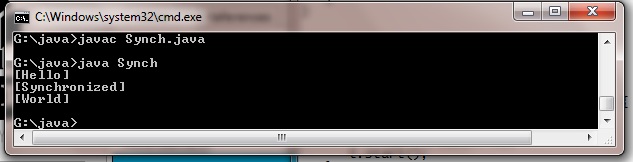
G:\>javac Synch.java
G:\>java Synch
[Hello]
[Synchronized]
[World]


Thread synchronization in java


Thread Priorities in java Programming

Java thread priority is one of the important concepts in java thread. Every thread created has some priority. Threads are executed according to their priority. Threads with higher priority are executed before threads with lower priority. A newly created thread has same priority as the thread that creates it.
Java thread scheduler uses the thread priority in the form of an integer value, it is used to determine the execution schedule of a thread. Threads with higher priority get the CPU time first.
Java thread priorities are integer values ranging from 1 to 10. 1 is the lowest priority and 10 is the highest priority. The default priority of a thread is 5.
The thread priorities are assigned to some constant literals as follows,
  1. Thread.MIN_PRIORITY : It is the minimum priority of any thread i.e. 1
  2. Thread.MAX_PRIORITY : It is the maximum priority of any thread i.e. 10
  3. Thread.NORM_PRIORITY : It is the normal and default priority of ant thread i.e. 5
To set the thread priorities we can use setPriority() method. Its syntax is,
final void setPriority(int level);
To obtain the current priority of a thread we can use getPriority() method. Its syntax is,
final int getPriority();


Setting thread priorities

Setting a threads priority can be very useful if one thread has more critical tasks to perform than another.
The Thread class has a method called setPriority(int level) with which you can alter the priority a Thread instance has.
The priority level range from 1 (least important) to 10 (most important) and if no level is explicitly set, a Thread instance has the priority level of 5.
In the first example below no priorites are set, so both threads have the priority level 5. The TestThread class implements the Runnable interface and in its
run() method loops from 1 to 10 and output the number along with its Thread id, which is passed to the constructor.

 Program Main.java


public class Main
{


    public void setPrioritiesOnThreads()
    {
      
        Thread thread1 = new Thread(new TestThread(1));
        Thread thread2 = new Thread(new TestThread(2));
      
        //Setting priorities on the Thread objects
        thread1.setPriority(Thread.MAX_PRIORITY);
        thread2.setPriority(Thread.MIN_PRIORITY);
      
        thread1.start();
        thread2.start();
      
        try {
          
            //Wait for the threads to finish
            thread1.join();
            thread2.join();
          
        } catch (InterruptedException ex) {
            ex.printStackTrace();
        }
      
        System.out.println("Done.");
      
      
    }
  

    public static void main(String[] args)
    {
        new Main().setPrioritiesOnThreads();
    }
  
  
    class TestThread implements Runnable
     {
      
        int id;
      
        public TestThread(int id)
        {
          
            this.id = id;
        }
      
        public void run()
        {
          
            for (int i = 1; i <= 10; i++)
            {
                System.out.println("Thread" + id + ": " + i);
            }
        }
    }
}


Output 

G:\>javac Main.java
G:\>java Main
Thread2: 1
Thread1: 1
Thread2: 2
Thread1: 2
Thread2: 3
Thread1: 3
Thread2: 4
Thread1: 4
Thread2: 5
Thread1: 5
Thread2: 6
Thread1: 6
Thread2: 7
Thread2: 8
Thread1: 7
Thread2: 9
Thread1: 8
Thread2: 10
Thread1: 9
Thread1: 10
Done.


Thread Priorities in java Programming


Using isAlive() and join() in java Programming

The main thread must be the last thread to finish. Sometimes this is accomplished by calling sleep() within main( ), with a long enough delay to ensure that all child threads terminate prior to the main thread. However, this is hardly a satisfactory solution, and it also raises a larger question: How can one thread know when another thread has ended? Fortunately, Thread provides a means by which you can answer this question.

Two ways exist to determine whether a thread has finished. First, you can call isAlive( ) on the thread. This method is defined by Thread, and its general form is shown here:

final boolean isAlive( )

The isAlive( ) method returns true if the thread upon which it is called is still running. It returns false otherwise. While isAlive( ) is occasionally useful, the method that you will more commonly use to wait for a thread to finish is called join( ), shown here:

final void join( ) throws InterruptedException

This method waits until the thread on which it is called terminates. Its name comes from the concept of the calling thread waiting until the specified thread joins it. Additional forms of join( ) allow you to specify a maximum amount of time that you want to wait for the specified thread to terminate. Here is an improved version of the preceding example that uses join( ) to ensure that the main thread is the last to stop. It also demonstrates the isAlive( ) method.

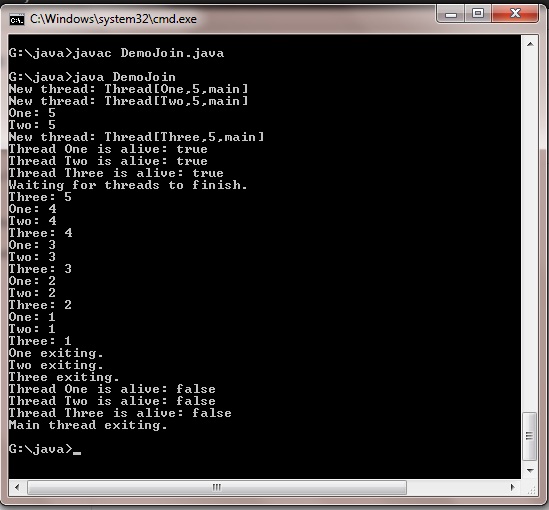
Program  DemoJoin.java

class NewThread implements Runnable
 {
  String name; 
  Thread t;
  NewThread(String threadname)
   {
    name = threadname;
    t = new Thread(this, name);
    System.out.println("New thread: " + t);
    t.start(); 
   }
  public void run()
   {
    try
     {
      for(int i = 5; i > 0; i--)
       {
         System.out.println(name + ": " + i);
         Thread.sleep(1000);
       }
     }
    catch (InterruptedException e)
     {
      System.out.println(name + " interrupted.");}
      System.out.println(name + " exiting.");
     }
 }

class DemoJoin
 {
   public static void main(String args[])
    {
      NewThread ob1 = new NewThread("One");
      NewThread ob2 = new NewThread("Two");
      NewThread ob3 = new NewThread("Three");
      System.out.println("Thread One is alive: "+ ob1.t.isAlive());
      System.out.println("Thread Two is alive: "+ ob2.t.isAlive());
      System.out.println("Thread Three is alive: "+ ob3.t.isAlive());
      try
       {
         System.out.println("Waiting for threads to finish.");
     ob1.t.join();
     ob2.t.join();
     ob3.t.join();
       }
      catch (InterruptedException e)
    {
         System.out.println("Main thread Interrupted");
        }
      System.out.println("Thread One is alive: "+ ob1.t.isAlive());
      System.out.println("Thread Two is alive: "+ ob2.t.isAlive());
      System.out.println("Thread Three is alive: "+ ob3.t.isAlive());
      System.out.println("Main thread exiting.");
    }
 }


Output

New thread: Thread[One,5,main]
New thread: Thread[Two,5,main]
New thread: Thread[Three,5,main]
Thread One is alive: true
Thread Two is alive: true
Thread Three is alive: true
Waiting for threads to finish.
One: 5
Two: 5
Three: 5
One: 4
Two: 4
Three: 4
One: 3
Two: 3
Three: 3
One: 2
Two: 2
Three: 2
One: 1
Two: 1
Three: 1
Two exiting.
Three exiting.
One exiting.
Thread One is alive: false
Thread Two is alive: false
Thread Three is alive: false
Main thread exiting.


Using isAlive() and join()  in java Programming

As you can see, after the calls to join( ) return, the threads have stopped executing.

Creating Multiple Threads in java

Objects provide a way to divide a program into independent sections. Often, you also need to turn a program into separate, independently running sub tasks.

Each of these independent sub tasks is called a thread, and you program as if each thread runs by itself and has the CPU to itself. Some underlying mechanism is actually dividing up the CPU time for you, but in general, you don’t have to think about it, which makes programming with multiple threads a much easier task.

A process is a self-contained running program with its own address space. A multitasking operating system is capable of running more than one process (program) at a time, while making it look like each one is chugging along on its own, by periodically providing CPU cycles to each process. A thread is a single sequential flow of control within a process. A single process can thus have multiple concurrently executing threads.

There are many possible uses for multithreading, but in general, you’ll have some part of your program tied to a particular event or resource, and you don’t want to hang up the rest of your program because of that. So you create a thread associated with that event or resource and let it run independently of the main program. A good example is a “quit” button—you don’t want to be forced to poll the quit button in every piece of code you write in your program and yet you want the quit button to be responsive, as if you were checking it regularly. In fact, one of the most immediately compelling reasons for multithreading is to produce a responsive user interface.

Program MultThreadDemo.java

class NewThread implements Runnable
{
 String name;
 Thread t;
 NewThread(String Threadname)
  {
   name=Threadname;
   t=new Thread(this,name);
   System.out.println("New thread :"+t);
   t.start();
  }
 public void run()
 {
  try
  {
   for(int i=5;i>0;i--)
   {
   System.out.println(name+":"+i);
   Thread.sleep(1000);
   }
  }

 catch(InterruptedException e)
  {
   System.out.println(name+"Interrupted");
  }
 System.out.println(name+"existing");
 }
}
class MultThreadDemo
  {
   public static void main(String arg[])
     {
      new NewThread("One");
      new NewThread("Two");
      new NewThread("Three");
      try
       {
        Thread.sleep(1000);
       }
      catch(InterruptedException e)
       {
        System.out.println("Main Thread Interrupted");
       }
      System.out.println("Main Thread Existing");
     }
  }
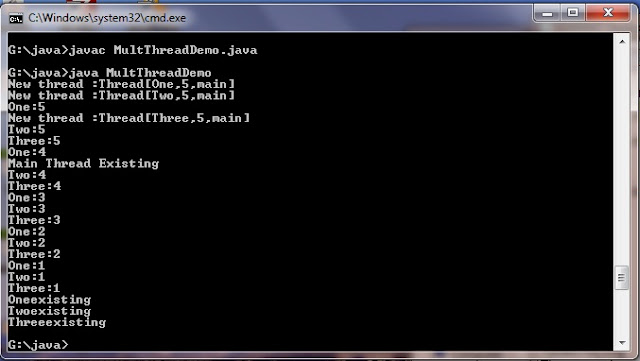
Output 


G:\>javac MultThreadDemo.java

G:\>java MultThreadDemo
New thread :Thread[One,5,main]
New thread :Thread[Two,5,main]
One:5
New thread :Thread[Three,5,main]
Two:5
Three:5
One:4
Main Thread Existing
Two:4
Three:4
One:3
Two:3
Three:3
One:2
Two:2
Three:2
One:1
Two:1
Three:1
Oneexisting
Twoexisting
Threeexisting


Creating Multiple Threads in java

Extending Thread in java

Sunday, 11 November 2012
The Second way to create a thread is to create a new class extends Thread,and then to create an instance of that class.The extending class must override the run() method ,Which is the entry point for the new thread .It must also call start() to beginning  execution of the new Thread.Here is the proceeding program rewritten to extend Thread

The procedure for creating  extending the Thread is as follows:


1. A class extending the Thread class overrides the run() method from the Thread class to define the code executed by the thread.

2. This subclass may call a Thread constructor explicitly in its constructors to initialize the thread, using the super() call.

3. The start() method inherited from the Thread class is invoked on the object of the class to make the thread eligible for running.

Below is a program that illustrates instantiation and running of threads by extending the Thread class instead of implementing the Runnable interface. To start the thread you need to invoke the start() method on your object.

Program : ExtendThread.java

public class ExtendThread extends Thread
{

  String word;
  public ExtendThread(String rm)
    {
        word = rm;
    }

  public void run()
    {

        try
      {
  
           for(int i=0;i<5;i++)
        {
             System.out.println(word);
                    Thread.sleep(1000);
                }
  
          }
        catch(InterruptedException e)
         {

          System.out.println("sleep intreupted");    
        }
     }

  public static void main(String[] args)
    {

    Thread t1=new ExtendThread("First Thread");
    Thread t2=new ExtendThread("Second Thread");
    t1.start();
    t2.start();
   }
}
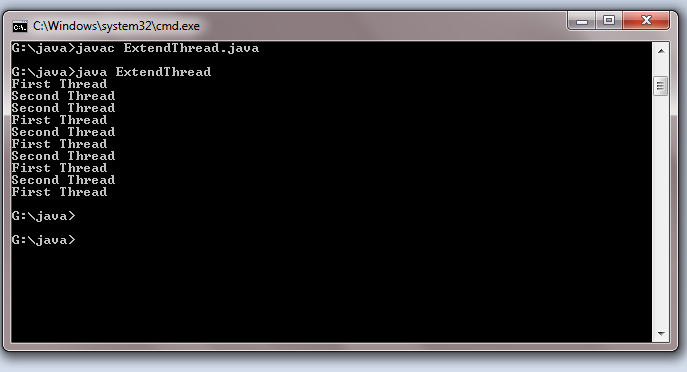
Output

G:\java>java ExtendThread
First Thread
Second Thread
Second Thread
First Thread
Second Thread
First Thread
Second Thread
First Thread
Second Thread
First Thread


Implementing the Runnable Interface in Thread

The easiest way to create a thread is to create a class that implements the Runnable interface. Runnable abstracts a unit of executable code. You can construct a thread on any object that implements Runnable. To implement Runnable, a class need only implement a single method called run( ), which is declared like this:

public void run( )

Inside run( ), you will define the code that constitutes the new thread. It is important to understand that   run( ) can call other methods, use other classes, and declare variables, just like the main thread can. The only difference is that run( ) establishes the entry point for another, concurrent thread of execution within your program. This thread will end when run( ) returns.

After you create a class that implements Runnable, you will instantiate an object of type Thread from within that class. Thread defines several constructors. The one that we will use is shown here:

Thread(Runnable threadOb, String threadName)

In this constructor, threadOb is an instance of a class that implements the Runnable interface. This defines where execution of the thread will begin. The name of the new thread is specified by threadName.

After the new thread is created, it will not start running until you call its start( ) method, which is declared within Thread. In essence, start( ) executes a call to run( ). The start() method is shown here:

void start( )


The procedure for creating threads based on the Runnable interface is as follows:


1. A class implements the Runnable interface, providing the run() method that will be executed by the thread. An object of this class is a Runnable object.

2. An object of Thread class is created by passing a Runnable object as argument to the Thread constructor. The Thread object now has a Runnable object that implements the run() method.

3. The start() method is invoked on the Thread object created in the previous step. The start() method returns immediately after a thread has been spawned.

4. The thread ends when the run() method ends, either by normal completion or by throwing an uncaught exception.

Here is an example that creates a new thread using Runnable interface and starts it running:


class NewThread implements Runnable
{

 Thread t;
 NewThread()

   {

    // Create a new, second thread

    t = new Thread(this, "Demo Thread");

    System.out.println("Child thread: " + t);

    t.start(); // Start the thread

   }

// This is the entry point for the second thread.

 public void run()
  {

    try
     {

      for(int i = 5; i > 0; i—)
       {

        System.out.println("Child Thread: " + i);

        Thread.sleep(500);

       }

     }
    catch (InterruptedException e)
     {

       System.out.println("Child interrupted.");

     }

        System.out.println("Exiting child thread.");

   }

}

class ThreadDemo
 {

   public static void main(String args[])
    {

     new NewThread(); // create a new thread

     try
     {

    for(int i = 5; i > 0; i—)
    {

     System.out.println("Main Thread: " + i);

     Thread.sleep(1000);

        }

    }
   catch (InterruptedException e)
    {

      System.out.println("Main thread interrupted.");

     }

    System.out.println("Main thread exiting.");

   }

 }

Inside NewThread's constructor, a new Thread object is created by the following statement:

t = new Thread(this, "Demo Thread");

Passing this as the first argument indicates that you want the new thread to call the run() method on this object. Next, start( ) is called, which starts the thread of execution beginning at the run( ) method. This causes the child thread's for loop to begin. After calling start( ), NewThread's constructor returns to main( ). When the main thread resumes, it enters its for loop. Both threads continue running, sharing the CPU, until their loops finish. The output produced by this program is as follows:


Output

Child thread: Thread[Demo Thread,5,main]
Main Thread: 5
Child Thread: 5
Child Thread: 4
Main Thread: 4
Child Thread: 3
Child Thread: 2
Main Thread: 3
Child Thread: 1
Exiting child thread.
Main Thread: 2
Main Thread: 1
Main thread exiting.


As mentioned earlier, in a multi threaded program, the main thread must be the last thread to finish running. If the main thread finishes before a child thread has completed, then the Java run-time system may "hang." The preceding program ensures that the main thread finishes last, because the main thread sleeps for 1,000 milliseconds between iterations, but the child thread sleeps for only 500 milliseconds. This causes the child thread to terminate earlier than the main thread. Shortly, you will see a better way to ensure that the main thread finishes last.


Implementing the Runnable Interface in Thread


The main thread in java

When a java program starts up one thread begins running immediately .This usually called the main Thread of your program ,Because it is the one that is executed when your program begins .The main thread is important for two reason

1) It is the thread from which other child threads will be spawned
2) Often it must be the last thread to finish execution because it performs various shutdown actions

 Although  the main thread is created automatically when your program is started ,it can be controlled through a Thread object.To do so ,you must obtain a reference to it by calling the method CurrentThread() , which is public Static members of thread .its general form is shown here
static Thread currentThread()


Program : CurrentThread.java

class CurrentThread
{
public static void main(String arg[])
    {
     Thread t=Thread.currentThread();
System.out.println("Current Thread : "+t);
t.setName("my Thread");
System.out.println("After name change :"+t);
try
{
for(int n=5;n>0;n--)
{
System.out.println(n);
Thread.sleep(1000);
}
}
catch(InterruptedException e)
{
System.out.println("Man Thread interrupted ");
}
}
}


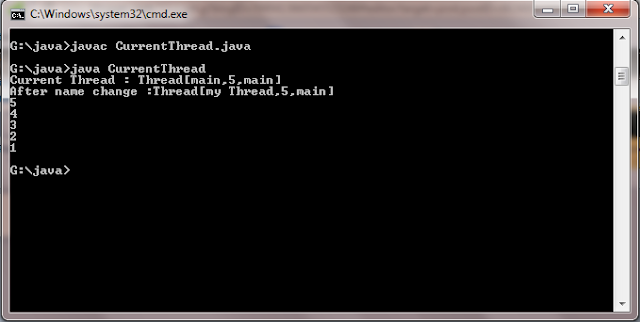
In this program a reference to the current thread is  obtained by calling currentThread() and this  reference is stored in the local variable .next ,the program  displays information about  the thread .The program then calls setName() to change the internal name of the thread .Information about the thread  is then redisplayed .Next a loops counts down from five pausing one second between each line .The pause is accomplished by the sleep() method .The argument to sleep() specifies the delay period in milliseconds .Notice the try/catch block around  this loop.The sleep() method in thread might throw an InterruptedException .This would happen if some other thread wanted to interrupt this sleeping one .This example just prints a message .if its gets interrupted .In a real program .You would need to handle this differently .Here is the output generated by this program


Output

Current thread :Thread[main,5,main]
after name change: Thread[my Thread ,5,main]
5
4
3
5

The main thread  in java
1

Introduction to Java Threads


 A thread is a thread of execution in a program. The Java Virtual Machine allows an application to have multiple threads of execution running concurrently.

A thread is an independent path of execution within a program. Many threads can run concurrently within a program. Every thread in Java is created and controlled by the java.lang.Thread class. A Java program can have many threads, and these threads can run concurrently, either asynchronously or synchronously.


Every thread has a priority. Threads with higher priority are executed in preference to threads with lower priority. Each thread may or may not also be marked as a daemon. When code running in some thread creates a new Thread object, the new thread has its priority initially set equal to the priority of the creating thread, and is a daemon thread if and only if the creating thread is a daemon.

When a Java Virtual Machine starts up, there is usually a single non-daemon thread (which typically calls the method named main of some designated class). The Java Virtual Machine continues to execute threads until either of the following occurs:


    The exit method of class Runtime has been called and the security manager has permitted the exit operation to take place.

    All threads that are not daemon threads have died, either by returning from the call to the run method or by throwing an exception that propagates beyond the run method.
 

learn java programming Copyright © 2011-2012 | Powered by appsackel.org