Showing posts with label Java package. Show all posts

Java Package Class Path and Access protection

Tuesday, 13 November 2012
How to Set the Class Path:

The classpath is a user defined environment variable that is used by Java to determine where predefined classes are located. It tells the java tools and applications where to find user-defined classes. The syntax to set the classpath is shown as:

C:> set CLASSPATH=%classpath%;classpath1;classpath2.....

You can set multiple path entries that are separated by semi-colons.
To make this thing more understandable, let's put the "HelloWorld" class along with its package "mypackage" under the "C:\mainpackage" directory. Thus the directory structure for this package is shown as:


Now we have changed the location of the package from C:\mypackage\HelloWorld.java to C:\mainpackage\mypackage\HelloWorld.java. Then the CLASSPATH  needs to be changed to point the new location of the package mypackage accordingly shown as:

set CLASSPATH = .;C:\mainpackage;

Although in such condition, Java will look for java classes from the current directory instead of the "C:\mainpackage" directory.


Access protection in packages:

 Access protection  Discription
 No modifier (default)  The classes and members specified in the same package are accessible to
all the classes inside the same package.
 public  The classes, methods and member variables under this specifier can be accessed from anywhere.
 protected  The classes, methods and member variables under this modifier are accessible by all subclasses,
and accessible by code in same package.
 private  The methods and member variables are accessible only inside the class.


Access to fields in Java at a Glance:

Access By public protected default private
The class itself Yes Yes Yes Yes
A subclass in same package Yes Yes Yes No
Non sub-class in the same package Yes Yes Yes No
A subclass in other package Yes Yes No No
Non subclass in other package Yes No No No

Java package Features and rules for use

Features of a Java package
  • The protected members of the classes can be accessed by each other in the same package.
  • It resolves the naming collision for the types it contains.
  • A package may have the following types.
    • Interfaces
    • Classes
    • Enumerated types
    • Annotations

Naming convention (Rules) for using  the packages
  • Package names are written in all lowercase to avoid conflict with the names of classes or interfaces.
  • The directory name must be same as the name of package that is created using "package" keyword in the source file.
  • Before running a program, the class path must be picked up till the main directory (or package) that is used in the program.
  • If we are not including any package in our java source file then the source file automatically goes to the default package.
  • In general, we start a package name begins with the order from top to bottom level.
  • In case of the internet domain, the name of the domain is treated in reverse (prefix) order. 

Simple java Package program for beginners

Simple java Package program  for beginnersTo create a package is quite easy ,simply include a Package command as the first statement in a java source file.Any classes declared  within that file will belong to the specified package.The package statement defines a name space in which classes are stored.If you omit the package statement ,the class names are put into the default package ,which has no name .while the default packages is fine for short ,sample program it is inadequate for real applications .Most of the time ,you will define a package for your code.


Given that packages exist and are a good mechanism for compartmentalizing diverse classes from each other, it is easy to see why all of the built-in Java classes are stored in packages. There are no core Java classes in the unnamed default package; all of the standard classes are stored in some named package. Since classes within packages must be fully qualified with their package name or names, it could become tedious to type in the long dot-separated package path name for every class you want to use. For this reason, Java includes the import statement to bring certain classes, or entire packages, into visibility. Once imported, a class can be referred to directly, using only its name. The import statement is a convenience to the programmer and is not technically needed to
write a complete Java program. If you are going to refer to a few dozen classes in your application, however, the import statement will save a lot of typing.

This is the general form of the package statement
 package pkg;

eg :
package  PackageName;

In a Java source file, import statements occur immediately following the package statement (if it exists) and before any class definitions. This is the general form of the import statement:

import pkg1[.pkg2].(classname|*);


Here, pkg1 is the name of a top-level package, and pkg2 is the name of a subordinate package inside the outer package separated by a dot (.). There is no practical limit on the depth of a package hierarchy, except that imposed by the file system. Finally, you specify either an explicit classname or a star (*), which indicates that the Java compiler should import the entire package. This code fragment shows both forms in use:

import java.util.Date;
import java.io.*;


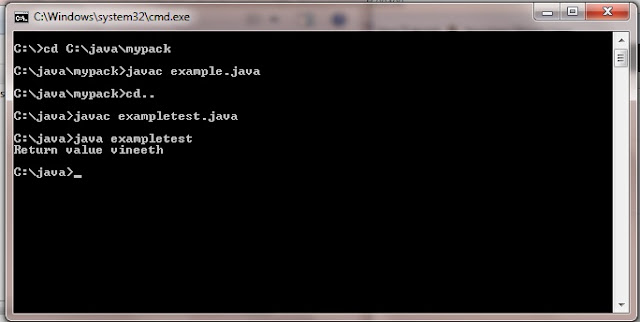
How to compile and execute java package


1)Create Folder Example

2)Create another directory inside Example named Mypack

3)Copy the file example.java inside mypack

4)Exit from Mypack directory and open Example directory

5)copy the file exampletest.java file inside Example directory

6)open cmd and compile  all the java file

7)Run the exampletest.java file


Program :example.java
file path :C:/Java/mypack/example.java

package mypack;
public class example
  {
   public String test(String str)
    {
       return str;
    }

  }
Program :exampletest.java
file path :C:/Java/exampletest.java

import mypack.*;

class exampletest
{
  public static void main(String args[])
   {
   example obj = new example();
   System.out.println("Return value "+obj.test("vineeth"));
   }
}

Output

C:\java>java exampletest
Return value vineeth

Simple java Package program for compile and run beginners


learn java programming Copyright © 2011-2012 | Powered by appsackel.org